
How the AI consultation works
A friendly chat where your AI team asks smart questions about your idea and turns it into a clear Blueprint.
What you'll do
The consultation is a short chat where your AI team asks the right questions to really understand your idea. By the end, you get a Blueprint: a plain-English plan you can read, refine, and share before anything gets built.
Step 1 — Open the consultation
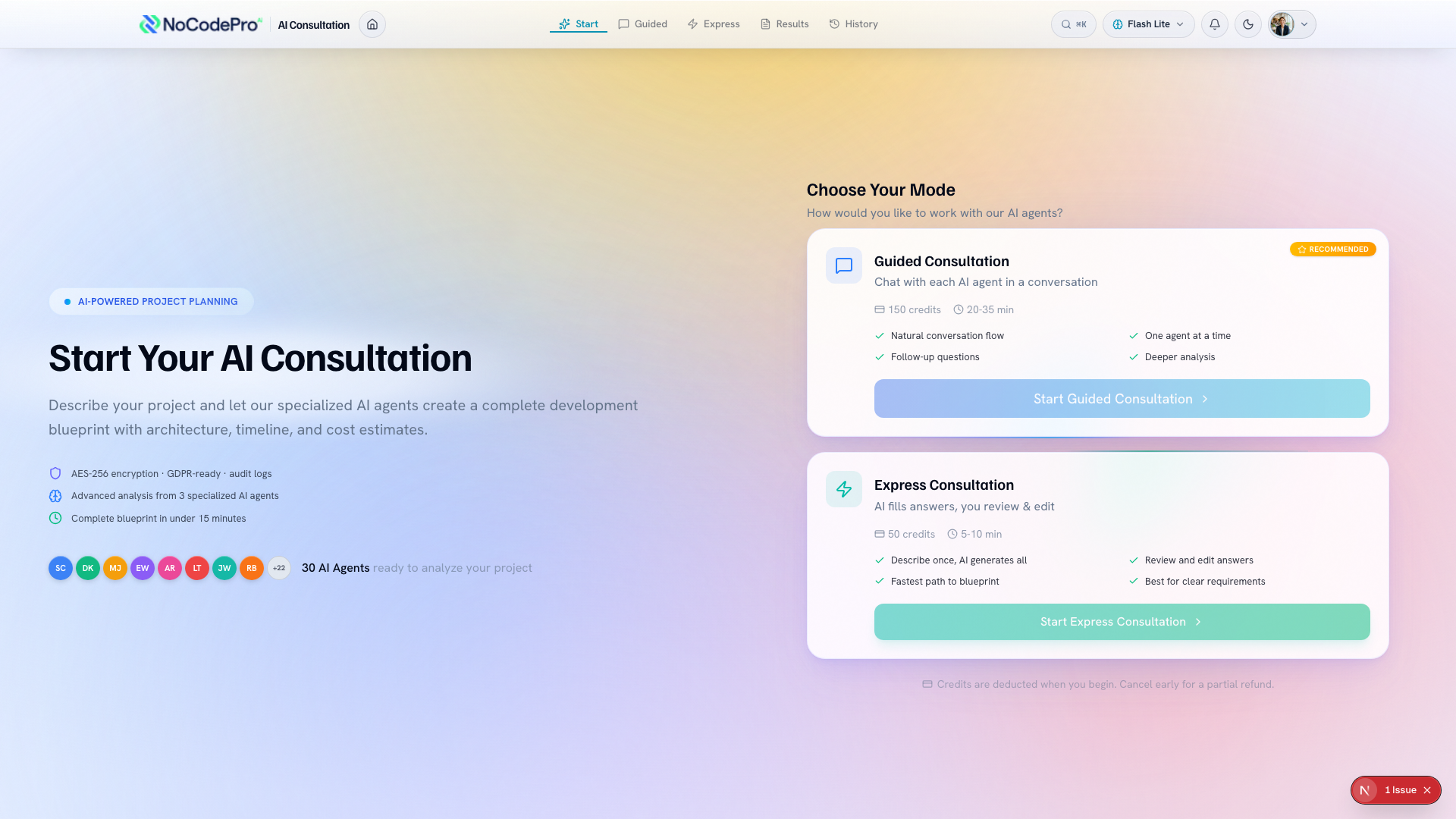
Go to the consultation area and choose a mode that fits how much detail you want to share: Guided or Express.
Guided asks the most questions and is great when you're starting fresh — you chat with each AI agent in turn. Express is faster: you describe your idea once and the AI fills in the answers for you to review and edit. There's no wrong choice, so pick what feels comfortable.
Step 2 — Describe your idea
Type your idea in your own words. Don't worry about getting it perfect.
Say what you want people to be able to do, who it's for, and what problem it solves. Even a few honest sentences give the AI plenty to work with.
Step 3 — Answer the questions
The AI reads your idea and asks follow-up questions, one topic at a time. These are easy, plain-language questions, not anything technical.
Answer in everyday words. If you're not sure about something, say so or skip it. The AI will fill in sensible suggestions you can change later.
You can take your time here. There's no timer, and you can think before you reply.
Step 4 — Get your Blueprint
When the AI has enough to go on, it writes your Blueprint. This is the plan your AI team will follow: the main features, how things fit together, and what your app will do.
Read it through. If anything looks off, you can refine it by chatting, or share it with a teammate for a second look. Nothing gets built until you're happy with the plan.
Tips
- Talking to your team is free. A consultation is the full piece of work at the end of that conversation — the interview that writes your Blueprint — and it is the part that uses Credit Tokens. Nothing is charged until you press Begin.
- Be specific about who will use your app and what they need to do first. That single detail shapes the whole Blueprint.
- It's fine to leave gaps. The AI suggests defaults, and you can adjust them at any point.
- Your Blueprint is a living plan, not a one-time form. Come back and refine it whenever your idea changes.
Finish your consultation:
- Open the consultation and pick a mode — choose Guided or Express.
- Describe your idea in your own words — say who it's for and what problem it solves.
- Answer the follow-up questions — reply in everyday words, or skip what you're unsure about.
- Read and refine your Blueprint — nothing gets built until you're happy with the plan.
What's next
Ready to phrase your idea clearly before you start? See Describe your idea well.