NoCodePro.AI
Why
Build your app
How it worksFrom idea to live appAI ConsultationFull interview that writes your blueprintBlueprintsYour app's structured specVisual BuilderEdit your app visuallyLive appsGo live with hosting handled
Your AI workforce
Ask the AI TeamTalking is free, on every planAI Agent DepartmentsMeet the team and what each ownsManaged Agentspowered byClaudeClaudeDepartments that run on their ownTemplatesProduction-ready starting pointsCreator templatesBuy one a builder made, or sell yours
Start building
Learn
DocumentationGuides and referenceBlogWhat we are buildingHelp CentreAnswers to common questions
Explore
About usWho is behind thisFeaturesEverything included, every planSystem statusLive uptime
Start building
PricingEnterprise
HomeGetting startedGuides
NoCodePro.AI

Your idea, built by whole AI Agent Departments.One conversation. A real app you own.

Get product updates
Made with care for people who build.

Product

  • How it works
  • AI Consultation
  • Blueprints
  • Visual Builder
  • Live apps
  • Pricing

Explore

  • Ask the AI Team
  • AI Agent Departments
  • Managed Agents
  • Templates
  • Creator templates
  • Features

Resources

  • Documentation
  • Blog
  • Help Centre

Company

  • About
  • Contact
  • Enterprise

Legal

  • Legal Centre
  • Privacy
  • Terms
  • Cookies
  • Security
  • Status
Checking status© 2026 NoCodePro.AI

We use cookies to run NoCodePro.AI and improve your experience. Cookie Policy

Docs▸Guides▸Plan your app▸How to describe your app idea so the AI gets it right
All guides
On this page
  • What you'll do
  • Step 1 — Open the consultation
  • Step 2 — Say who it's for and what it does
  • Step 3 — Add a short example
  • Step 4 — Send it and keep going
  • Tips
  • What's next
GuidePlan your app

How to describe your app idea so the AI gets it right

Write a clear first description of your app so your AI consultation starts on the right foot.

Beginner·NoCodePro.AI Team·2026-06-20·3 min read
getting startedconsultationidea

What you'll do

You'll write a short, clear description of the app you want, then hand it to your AI team to kick off the consultation. A good first description means less back-and-forth and a Blueprint that matches what you actually had in mind.

Step 1 — Open the consultation

Go to the Consultation area and choose to start a new one. You'll pick how much hand-holding you want: Guided walks you through it step by step, and Express moves faster by having the AI fill in answers you then review. If you're new, Guided is a friendly place to start.
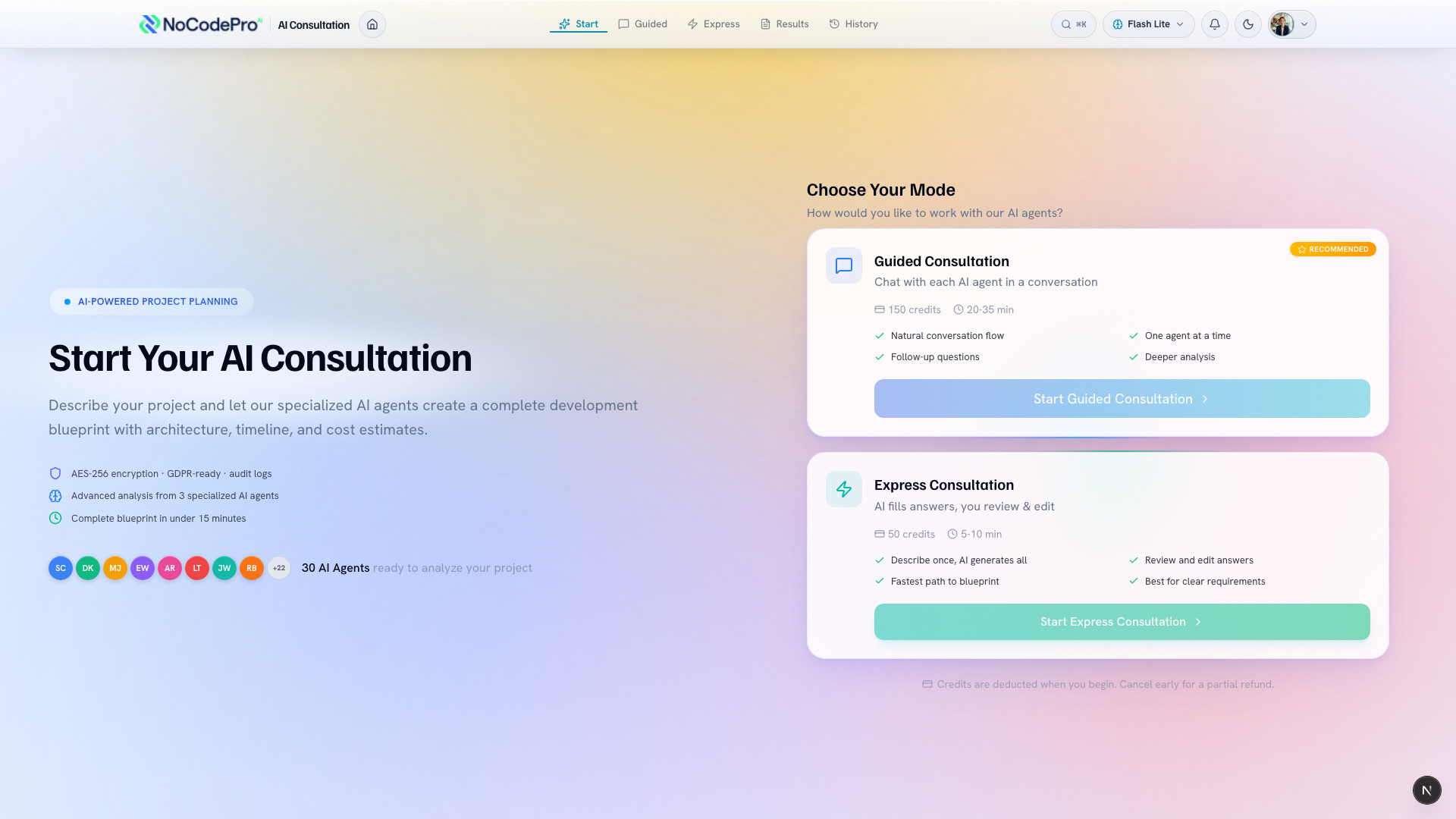
The consultation start screen with the Guided and Express options

Step 2 — Say who it's for and what it does

In your own words, write down three things:

  1. Who it's for — your customers, your team, students, members.
  2. What it should do — the main job the app helps people get done.
  3. Two or three must-have features — the parts you can't launch without.

Keep it plain. You don't need to know how anything works behind the scenes. Just describe the result you want.

Step 3 — Add a short example

A quick example makes everything clearer. Try a shape like this:

"An app for small bakeries to take cake orders. Customers pick a cake, choose a pickup day, and pay a deposit. Must-haves: an order form, online payment, and an email confirmation."

Notice it names the audience, the main job, and a few features, all in a couple of sentences. Yours can be just as short.

Step 4 — Send it and keep going

Submit your description to start the chat. Your AI team will ask follow-up questions, and you can add detail as you go, so don't worry about getting everything perfect up front. When you're happy, the consultation turns your answers into a Blueprint: a plain-language plan you can read, refine, and share before any building begins.

Tips

  • Describe the outcome you want, not how to build it. Plain language beats technical terms here.
  • Three must-have features is plenty for a first pass. You can always add more during the chat.
  • Mention anything important, like taking payments or letting people sign in, so it's captured early.

What's next

Once your idea is in, see how the conversation works in Understanding the AI consultation.

Was this article helpful?Your feedback helps us write better guides.
Related articles
How the AI consultation worksPlan your app · 3 min read
→
How to read and refine your blueprintPlan your app · 2 min read
→
How to describe your app idea so the AI gets it right · Guides · Docs | NoCodePro.AI